MapOps · Expansion Workspace · HVAC · regional Australia

Australian HVAC territory intelligence system

MapOps helps Australian air-conditioning and mechanical service businesses plan territories, prioritise suburbs and accounts, improve service coverage, and create stronger local sales conversations from the same shared system.

Leadership sees highest-priority markets and coverage gaps. Sales representatives get assigned territories, priority accounts, and local opportunity context. Prospects can be shown a tailored market view that explains why a service conversation is relevant.

Explore the sample territory system to see leadership, rep, and prospect views. Book a live demo to walk your region, depots, and rollout plan.

30 minutes · live workspace walkthrough · no obligation

Markets scored
Opportunity + ops fit
Territory drawn
SA2-level precision
90-day system
Prescribed rollout

Illustrative suburb bands. Exact scores are shown on a live demo.

The problem

HVAC expansion is expensive to get wrong

Adding a crew, opening a depot, or chasing a new corridor without territory intelligence burns cash on drive time, weak leads, and false starts. Expansion Workspace exists so the decision is evidence-led before you commit vans to the road.

Expansion by gut feel

Owners debate Wollongong vs Campbelltown vs Newcastle with no shared evidence. just anecdotes and competitor rumours.

CRM data, no territory story

You have job history in the system, but no way to see where you already win, where greenfield opportunity sits, or what drive time does to margin.

Consultants deliver slides, not systems

Strategy decks age in a folder. There is no living map, no ranked markets, and no 90-day rollout your ops team can actually run.

The product

One workspace. One expansion decision.

Expansion Workspace is MapOps' Australian HVAC growth dashboard: an interactive decision-support system for territory planning, competitor mapping, and branch or crew deployment. It is not a generic GIS tool, off-the-shelf BI dashboard, or static consulting report. Regional intelligence is pre-built; your company profile and optional customer history layer on top in a configured workspace.

Executive decision

One recommended market, confidence rating, and a plain-language conclusion your leadership team can align on in a single session.

Market ranking

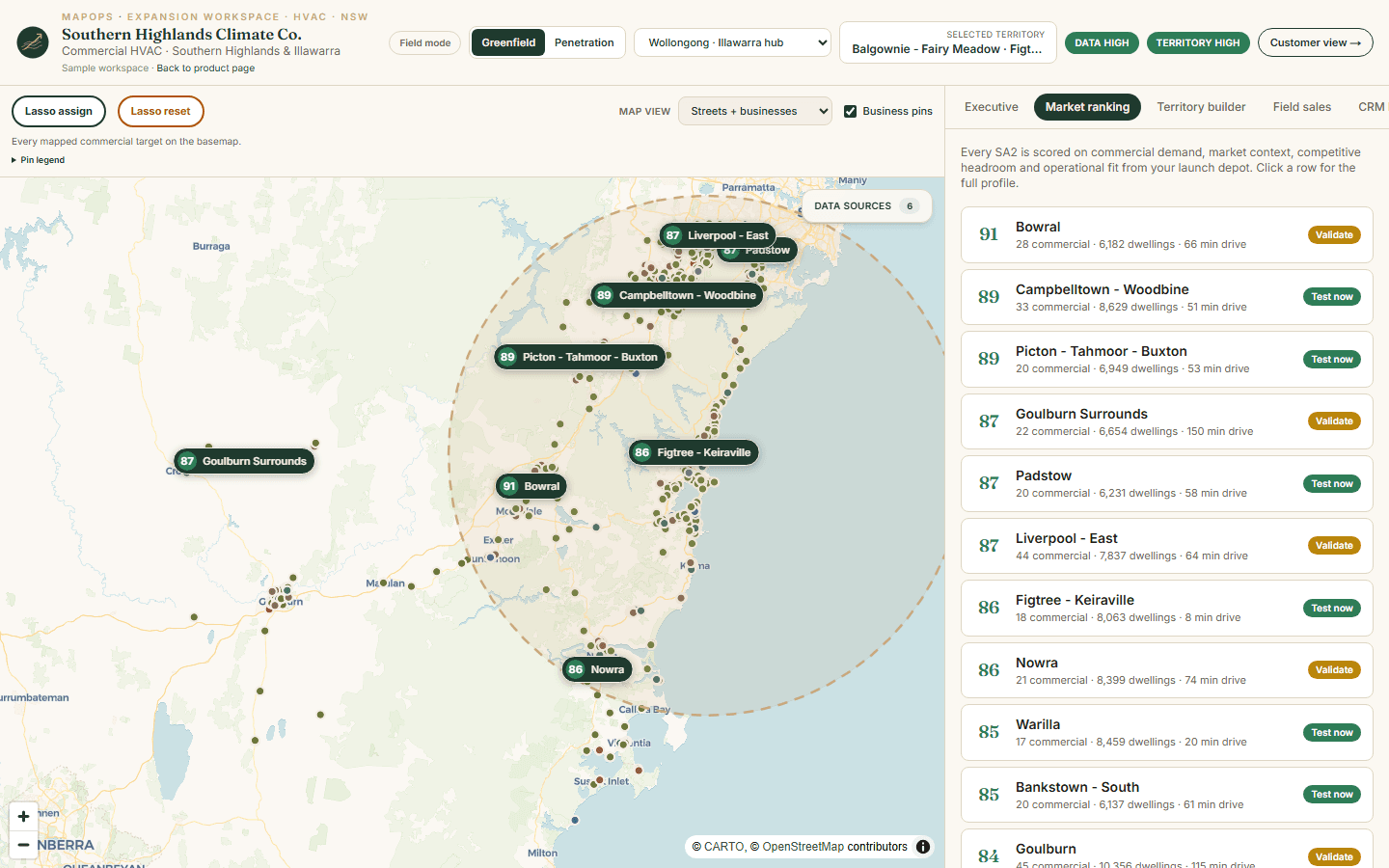
Every SA2 statistical area scored for commercial HVAC opportunity, competitive white space, and operational fit from your launch depot.

Territory map

Interactive choropleths for expansion potential, climate demand, and mapped B2B targets, plus optional aggregate customer footprint.

Territory builder

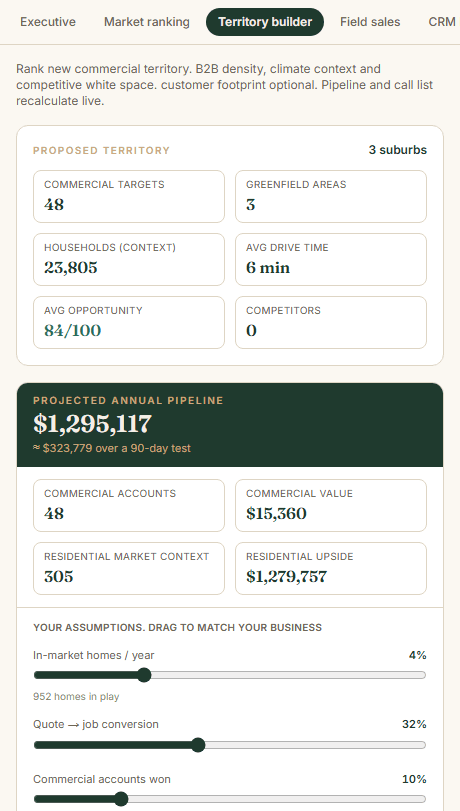
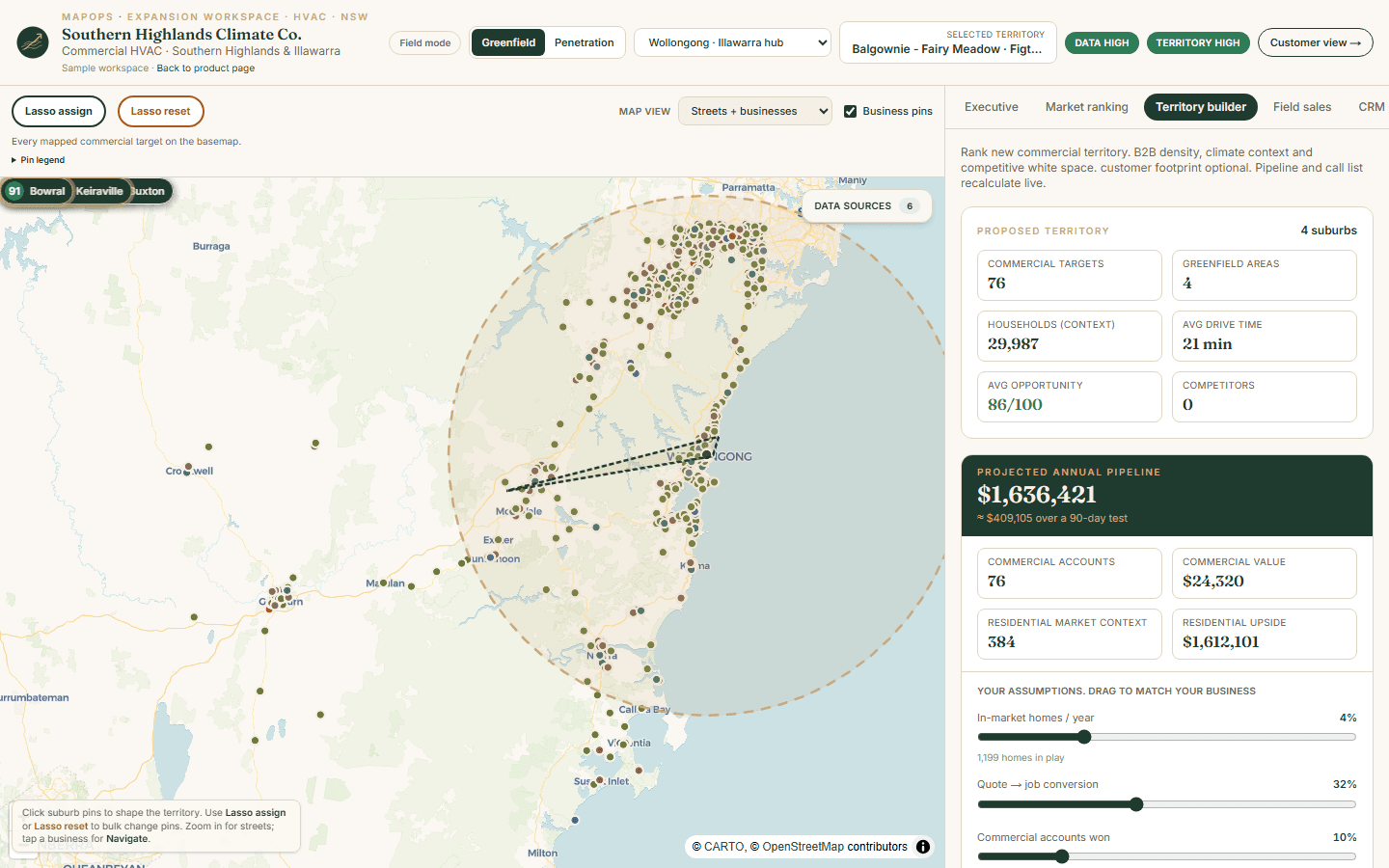
Draw a greenfield expansion patch SA2 by SA2. Watch scores, drive times, and business counts update as you shape the trial.

CRM blueprint

Import-ready pipeline stages, field schema, and routing rules. The structure your CRM needs before spend, not after.

90-day rollout frame

A prescribed prepare, launch, and evaluate cadence so the territory test has a finish line and a decision gate.

How it works

Regional data once. Client decisions many.

MapOps owns the intelligence layer. You bring the operator context. Together that produces a territory decision your team can execute across NSW and beyond.

  1. 01

    Pick your region

    MapOps pre-builds regional intelligence for each territory package. businesses, census, climate, and statistical boundaries ingested once, reused for every client in that patch.

  2. 02

    Configure your workspace

    Set launch depot, crew constraints, and optional customer CSV. The engine re-scores markets and operational fit from your actual base, not a generic state average.

  3. 03

    Run the 90-day test

    Export the territory plan, CRM structure, and pursuit list. Execute the rollout. Return to the workspace at day 90 to decide: expand, narrow, or pivot.

Regional intelligence

Not a blank map. A researched region.

Each MapOps region package ingests public and open data for a defined geography, clipped, normalised, and kept current. Adding a new Australian region is a repeatable pipeline, not a custom GIS project every time.

The public preview shows open regional layers only. Proprietary market scoring, tuned for commercial HVAC greenfield expansion, is shown on a live demo. Opportunity scores are decision-support outputs based on selected data, assumptions, and scoring criteria. They are not guaranteed predictions.

MapOps can build a dashboard from public data alone or combine it with client customer, CRM, lead, or service records when you provide them. Purchased or synthetic data is not implied unless explicitly configured for a client workspace.

  • Commercial targets

    Healthcare, hospitality, aged care, builders, competitors

    OpenStreetMap
  • Market context

    Dwellings, income, housing stock, SEIFA by suburb and SA2

    ABS Census 2021
  • Climate demand

    Heating and cooling load by SA2 statistical area

    BoM-derived
  • Growth signals

    New dwelling approvals as expansion proxy

    ABS approvals
  • Your footprint

    Aggregate SA2 penetration, privacy-safe by default

    Client CSV

Sample territory system

Explore the map, then see leadership, rep, and prospect views

Pan the interactive regional map, toggle open data layers, and click SA2 areas for local context. Switch tabs for sample ranked markets, rep priority accounts, and a prospect story. Full scoring and your region deploy on engagement.

Interactive map

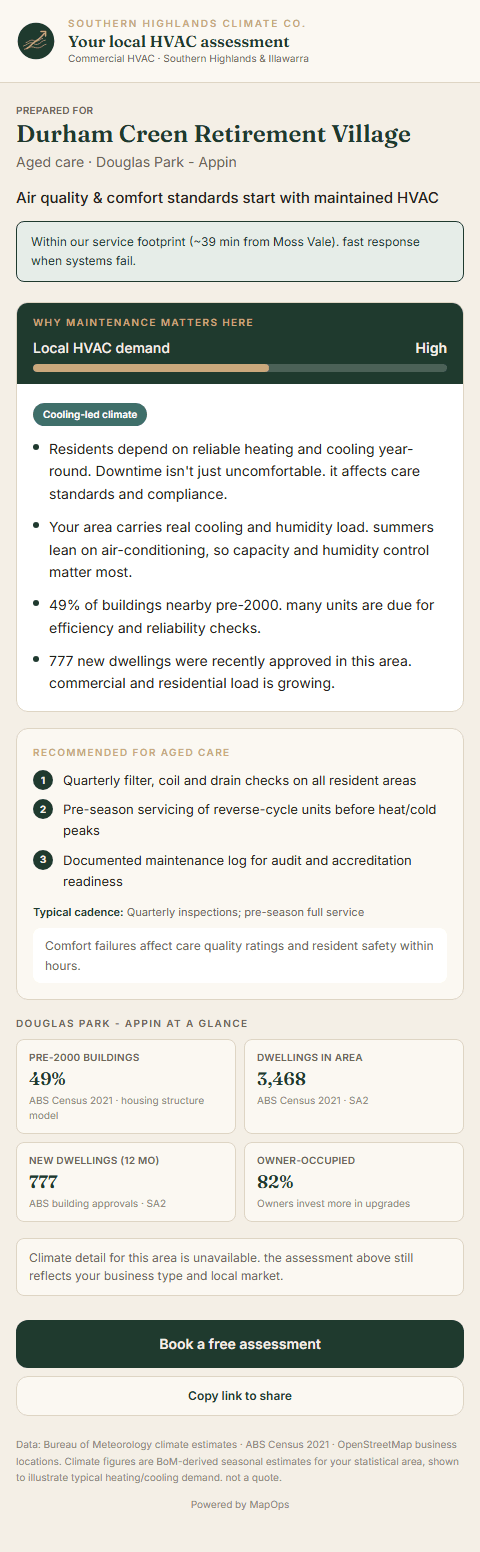
Real Illawarra regional data. toggle census, climate, and commercial business pins on the map.

Sales rep

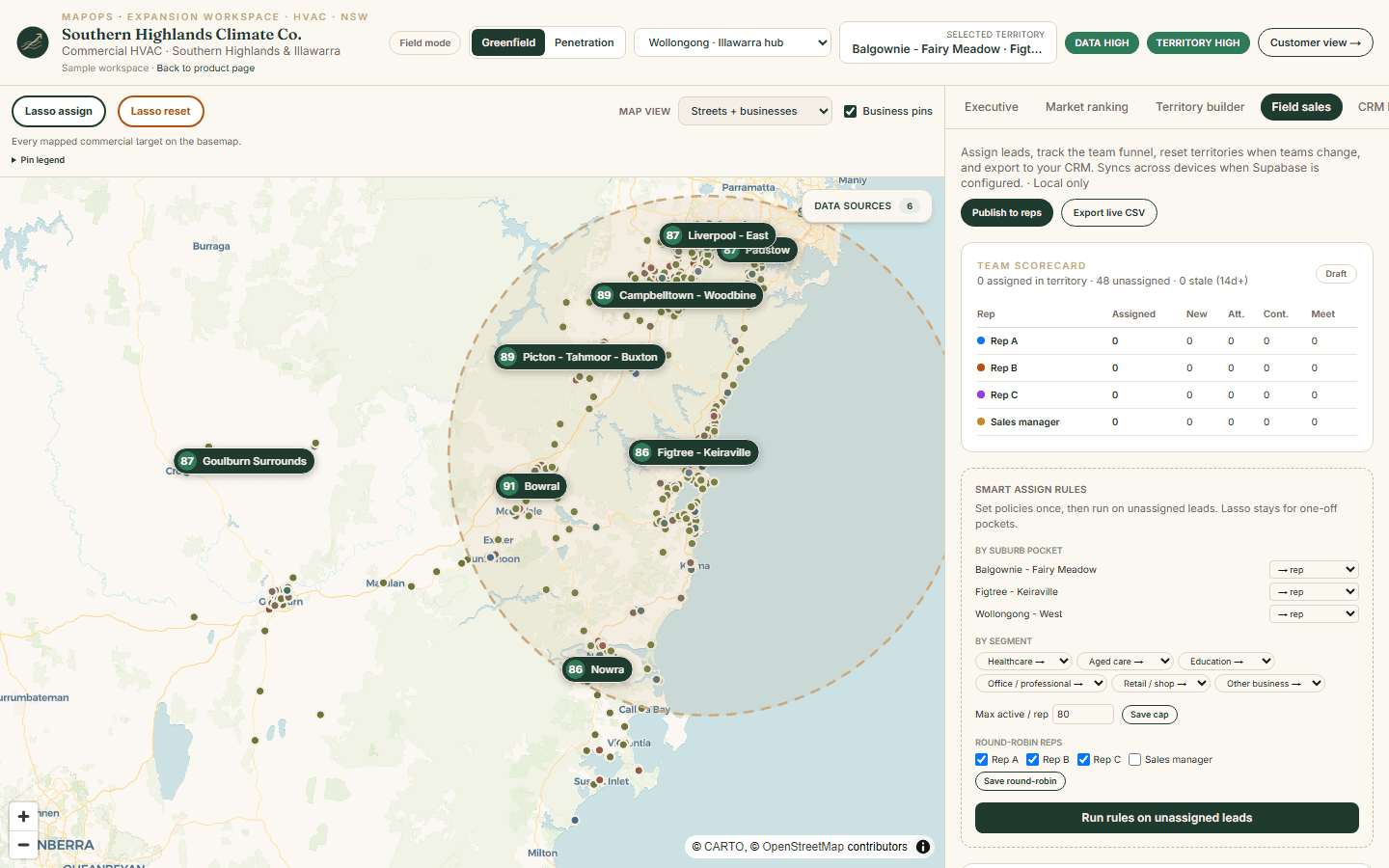
Lasso assign business pins, set outreach status, and filter your list on the map.

Prospect

Example local market story that explains why a service conversation is relevant.

Regional map previews

Open regional data on the interactive map. Scoring and ranked outputs stay in the sample system or live demo.

Live demo

See the full system. scoring, rankings, and territory decisions.

The sample territory system shows example leadership, rep, and prospect views. A 30-minute demo with a MapOps builder shows everything else: how we score markets for commercial HVAC, how you draw a trial territory, and what a 90-day expansion test looks like for your business.

Bring your expansion question. Leave with clarity on whether to commit the next crew.

In 30 minutes you will see

  • Ranked markets and proprietary scoring on your region, not available in the sample system
  • Territory builder: shape a greenfield patch and see drive time and commercial density respond
  • Executive decision view. recommended market, confidence, and plain-language conclusion
  • CRM blueprint and 90-day rollout frame tailored to your depot and crew constraints
  • Honest fit check. we'll tell you if Expansion Workspace is right for your expansion stage

No slide deck. Live workspace on real Illawarra / Hunter data, configured around your scenario where possible.

What you walk away with

A decision and the system to test it

These are what you walk through on a live demo and receive in a configured client workspace, not in the public map preview. Everything is designed for a 90-day territory trial with a clear day-90 gate.

Interactive Expansion Workspace

  • Executive decision summary with confidence rating
  • Ranked market cards with action labels
  • Full-screen territory map with layer controls

Go-to-market exports

  • CRM pipeline and field schema CSVs
  • Lead routing rules by geography
  • Scored referral and partner pursuit list

Shareable customer views

  • Prospect proof pages (per-business HVAC story)
  • Climate and demand coverage explorer
  • Privacy-safe aggregate footprint on map

Get started

Preview free. Decide on a demo.

Most operators book a live demo after the sample territory system. when they want to see how scoring and territory decisions actually work for commercial HVAC expansion.

Expansion Workspace demo

Free · self-serve

Full interactive workspace: ranked markets, territory builder, scoring modes, 90-day trial tracking, rep call list, and CRM exports. Illawarra demo data.

Open demo workspace
Most popular

Live demo

30 minutes

Walk the full Expansion Workspace with a MapOps builder: ranked markets, proprietary scoring, territory builder, CRM exports, and a 90-day plan framed around your depot and expansion question.

Book a live demo

Client workspace

After demo

Configured workspace for your business. your depots, optional customer data, and a territory test your team runs for 90 days. Scoped after a successful demo.

Email us

Built by MapOps . regional territory intelligence systems for field-service operators.

FAQ

HVAC growth dashboard questions

Answers about Australian HVAC market analysis, territory planning, competitor mapping, and how MapOps combines public regional data with optional client customer or CRM data.

What is an HVAC growth dashboard?

An HVAC growth dashboard is an interactive decision-support workspace that combines regional market data, suburb-level demographics, climate context, competitor locations, and optional customer footprint into ranked expansion opportunities. MapOps builds these as custom regional dashboards for air conditioning and mechanical service businesses, not as a generic map or off-the-shelf BI template.

How can an HVAC company identify new service areas?

Start with suburb and region-level signals: commercial target density, dwelling growth, heating and cooling demand, drive time from your depot, competitor coverage, and where existing customers cluster. Expansion Workspace layers these on an interactive map, then ranks statistical areas so leadership can compare greenfield suburbs before committing a crew or branch.

What data helps an HVAC company choose where to expand?

Useful inputs include ABS Census demographics and dwellings, building approvals, BoM-derived climate load, OpenStreetMap commercial targets, mapped competitor locations, and optionally your CRM or service job history aggregated by suburb. MapOps ingests public sources into a region package and can layer client customer or lead data when you provide it.

Can MapOps build a dashboard without client CRM data?

Yes. A regional growth dashboard can run on public and open market data alone. Customer, CRM, lead, or service history is optional. When supplied, MapOps shows aggregate suburb footprint by default to highlight service coverage gaps and greenfield opportunity without exposing street-level customer pins in public views.

Can MapOps combine public data with customer and lead data?

Yes. MapOps can combine ingested public regional data with client-supplied customer, CRM, lead, or service records where available. Client data is stored securely and is typically summarised at suburb or SA2 level for territory planning. The public map preview shows open regional layers only.

How can climate data help estimate HVAC demand?

Heating and cooling load varies by region. BoM-derived seasonal estimates at suburb level help explain where air conditioning, reverse-cycle, and heating service demand is structurally higher. Climate layers provide market context alongside dwelling counts and commercial density. They support planning; they are not a guarantee of revenue.

How can competitor mapping help an HVAC company?

Mapping competitor locations against suburbs, postcodes, and commercial clusters shows where local capacity may be thin, where response times stretch in peak season, and where greenfield pursuit may face less saturation. Competitor mapping is one input in MapOps opportunity scoring, not a standalone verdict.

How can an HVAC company decide where to place its next technician or crew?

Compare ranked suburbs for commercial density, drive time from your launch depot, underserved pockets, growth signals, and fit with your service mix. A live demo walks territory builder tools and a 90-day rollout frame so you can test one patch before hiring or redeploying technicians.

What can I see in the free map preview?

The regional map preview shows real ingested open data: commercial targets, ABS Census demographics, BoM climate context, and building approvals. It does not include proprietary opportunity scores, market rankings, territory builder, or CRM exports.

How are opportunity scores calculated?

Opportunity scores are decision-support outputs based on selected public regional data, industry-specific scoring criteria, operational assumptions such as depot location and drive time, and optional client footprint when provided. They are not predictions or guarantees. We explain inputs and limitations on a live demo.

What happens on a live demo?

A 30-minute walkthrough with a MapOps builder on real regional data. You will see ranked markets, proprietary scoring, territory builder, executive decision view, and how a 90-day expansion test would be framed for your depot, configured around your scenario where possible.

How does this connect to mapops.co?

This site is the Australian HVAC Growth Dashboard product surface built by MapOps. MapOps is the parent company for custom regional growth dashboards across industries and regions. Explore map previews here or visit mapops.co for the company overview.

Still deciding?

Most operators book a demo after the map preview. 30 minutes, no obligation.

Book a live demo